
Travel passersby
Good for one person passing through the background.
remove person from video
Remove tourists, passersby, and background people while reconstructing the area they covered.
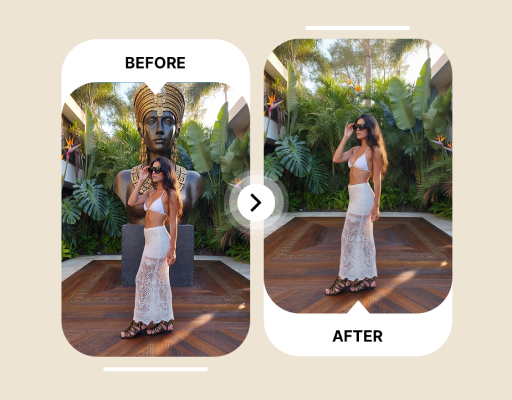
This uses the live product workflow. Short, specific English prompts are usually steadier.
Short English prompts usually produce the most stable result. Your prompt is sent as written.
This owned demo shows the source clip and real processed result without presenting it as a page-specific result.
A person is easier to identify when they remain separate from the main subject.
Good for one person passing through the background.
Clean a crew member near the edge or in the background.
Keep the product as the clear subject and describe the person by clothing and position.
Clothing color, frame position, motion, and relation to the subject work better than only person.
Avoid footage where the person is repeatedly hidden behind the subject.
For example, wearing a red jacket behind the main subject.
Check texture, shadows, and overlaps along the person path.
Use visible features and position instead of relying on a name.
remove the person in the red jacket behind the coupleremove the tourist walking on the left sideremove the staff member standing behind the productReconstruction becomes harder when a person covers a large area, overlaps the subject, or moves quickly.
Describe color, position, appearance, and motion instead of using a vague pronoun.
Short footage, stable backgrounds, and limited occlusion usually produce more consistent frames.
Check edges, texture, motion, and audio before using the processed video in a final edit.
You can try, but processing one clearly identified person at a time is usually easier to review and more stable.
A foreground person can cover a large and unique part of the scene. A background passerby is usually easier, while a large foreground removal may require clean-plate compositing.
Not always automatically. Review floor shadows, mirrors, windows, and water separately, and include them in another pass if they remain visible.
It can attempt the shot, but camera motion changes scale, angle, and perspective. Shorten the clip and inspect the entire reconstructed path for drift or flicker.
Eligible verified accounts receive 3 credits for up to 3 seconds of processing. Free accounts support clips up to 10 seconds and 50MB, subject to their credit balance.
ObjectRemover accepts MP4 and MOV up to 1080p and 60fps. All plans support files up to 100MB.
Sources are deleted 24 hours after a job ends. Results stay for 7, 30, 60, or 90 days by plan.
You can choose whether to preserve source audio when submitting the job. Listen to the complete download afterward to confirm duration, sync, and content.
The result must be encoded as a new video. Upload the highest-quality source available and avoid repeated compression or low-quality social-media downloads before processing.
You can try, but describing one clear target per pass is usually steadier and makes it easier to identify which target or time range needs another attempt.
Trim to one continuous shot and add target color, position, appearance, and motion. If the target overlaps the subject for a long time, use a desktop editor with masks and tracking.
Upload a video and describe the person by clothing, position, and motion.