
Import your video
Choose a clear MP4 or MOV and confirm the target is visible in the frame.
AI video object removal
Remove people, text, logos, and other unwanted objects from MP4 or MOV video online with AI. Upload a clip and describe the target to start.
Try ObjectRemoverShort English prompts usually produce the most stable result. Your prompt is sent as written.
Upload an MP4 or MOV clip, describe one unwanted person, text element, logo, or object in a specific English prompt, and ObjectRemover processes the target across consecutive frames. Review the complete result before downloading it.
Watch the selected object disappear while the surrounding scene stays consistent across the clip.
Choose a clear MP4 or MOV and confirm the target is visible in the frame.
Describe the target color, position, appearance, or motion in one specific English sentence.
Process the clip, then review its edges, texture, and motion continuity before downloading.
See common cleanup targets before you upload. Clear targets with limited occlusion generally produce stronger results.

Useful for tourists, event attendees, and brief passersby.

Small objects with clear edges over stable backgrounds are easier to rebuild.

Describe the text color, position, and visible time range for a precise target.
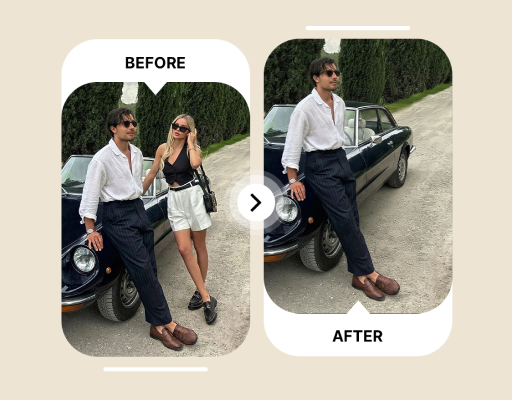
Review the subject edge, shadow, and background continuity after removal.
One credit covers one billable second. Partial seconds round up to the next whole second.
For short videos and occasional edits.
$33.30At the 30-credit pack rate
Billed monthly · Credits issued monthly
100 credits every month
100 seconds of video processing included each month
For active creators publishing every week.
$99.90At the 30-credit pack rate
Billed monthly · Credits issued monthly
300 credits every month
300 seconds of video processing included each month
For teams with frequent production work.
$283.05At the 30-credit pack rate
Billed monthly · Credits issued monthly
850 credits every month
850 seconds of video processing included each month
Upload a video and describe one person or object in a specific English prompt. The system identifies the target across consecutive frames, removes its pixels, and reconstructs the covered area from surrounding texture and nearby frames. Play and scrub the result to check edges, texture, and motion consistency.
ObjectRemover accepts MP4 and MOV videos.
Eligible verified accounts receive 3 credits. Processing costs 1 credit per second, rounded up; reward and purchased credits can be combined.
It can attempt moving targets that remain identifiable across frames. Fast motion, heavy blur, long occlusion, and overlap with the main subject make reconstruction harder.
Short, specific English prompts are currently recommended. The prompt is submitted exactly as written and is not translated. Include the target name, color, position, appearance, or motion.
You can choose whether to preserve source audio when submitting the job. Listen to the complete download afterward to confirm duration, synchronization, and content.
The result must be encoded as a new video. Upload the highest-quality source available and avoid repeated compression or low-quality copies downloaded from social platforms.
One credit covers one billable second. Partial seconds round up to the next whole second.
The homepage returns to the upload entry and stops listening. Your submitted job remains available in the workspace.
Only from media you own or may edit. Removing third-party copyright marks or rights controls is prohibited.
Sources are deleted 24 hours after a job ends. Results stay for 7, 30, 60, or 90 days by plan.
Uploads use private storage and controlled access. Source files and processed results are automatically cleaned according to the published retention rules and selected plan.
Jobs are billed by the second.